Demo
This docker-based demo deployment runs a local ThingsBoard instance together with the TEG gateway and a simulated controller. It is meant for showcasing the teg-gateway’s features in an easy to set up example environment.
What the demo includes
ThingsBoard CE + Postgres
TEG gateway container built from this repository
Example controller that generates simulated sensor data
Optional TLS reverse proxy (nginx) with a self-signed certificate
Example thingsboard dashboard for visualizing the simulated sensor data
Requirements
Docker
Docker Compose
Optional: openssl (only if you want to regenerate the self-signed cert)
Install Docker
Windows/macOS
Docker Desktop (includes Docker Compose).
MacOS (via Homebrew)
brew install --cask docker-desktop
brew install docker-compose
Linux
Docker Engine and the Compose plugin from https://docs.docker.com/engine/install/ and https://docs.docker.com/compose/install/linux/.
sudo apt update
sudo apt install docker.io docker-compose-v2
Optional TLS tooling
sudo apt install openssl
Verify requirements
Verify that the CLIs are available:
docker --version
docker compose version
Optional:
openssl version
Prepare the demo data directory
Create a local data folder and point the demo to it:
cd demo
mkdir -p data/teg-gateway
echo "TEG_DATA_PATH=$(realpath data/teg-gateway)" >> .env
Run the full demo (local ThingsBoard)
Initialize ThingsBoard on first run:
docker compose -f docker-compose-thingsboard.yml run --rm \
    -e INSTALL_TB=true -e LOAD_DEMO=true thingsboard
Output should look similar to:
Starting ThingsBoard Installation...
Installing database schema for entities...
...
Loading system images and resources...
Loading demo data...
Installation finished successfully!
To run the demo once it has been initialized:
docker compose -f docker-compose-thingsboard.yml up
Access ThingsBoard GUI at http://localhost:8080/ and sign in with:
user: tenant@thingsboard.org
password: tenant
Enable device self-provisioning
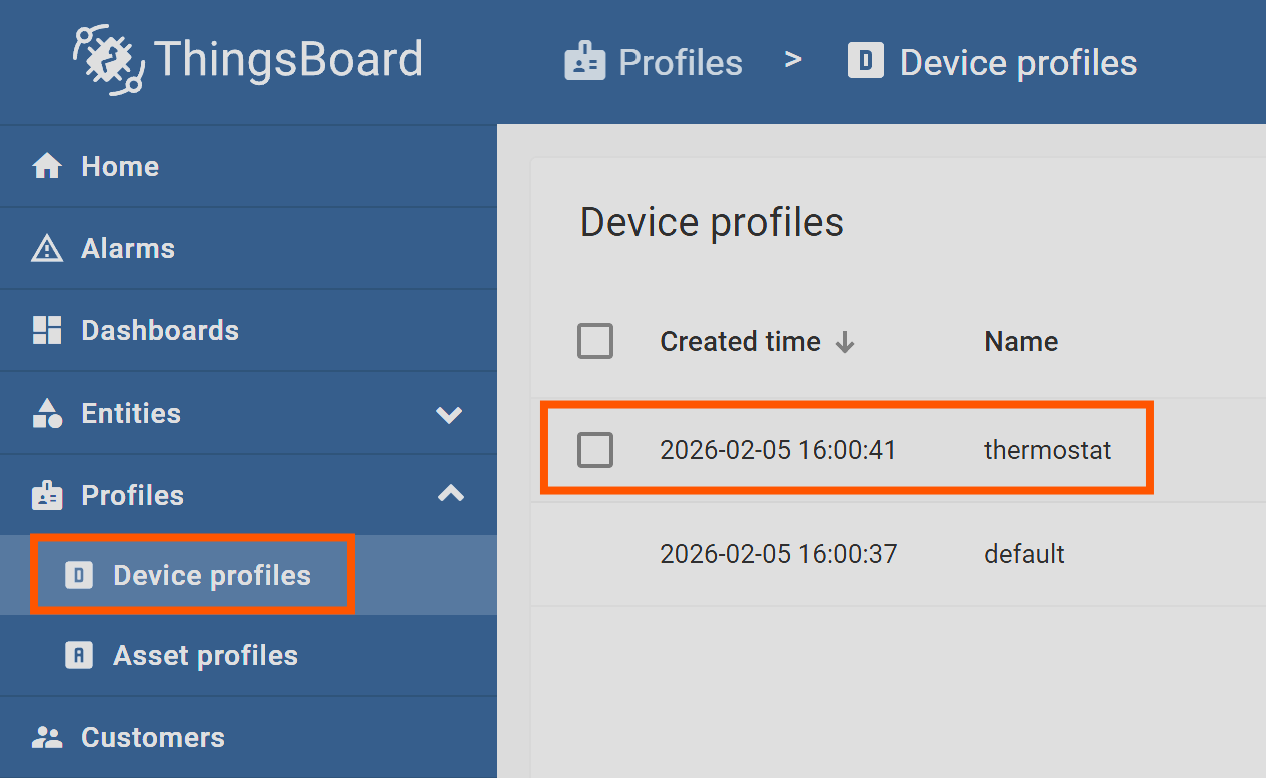
Assign the self-provisioning credentials to the “thermostat” device profile:
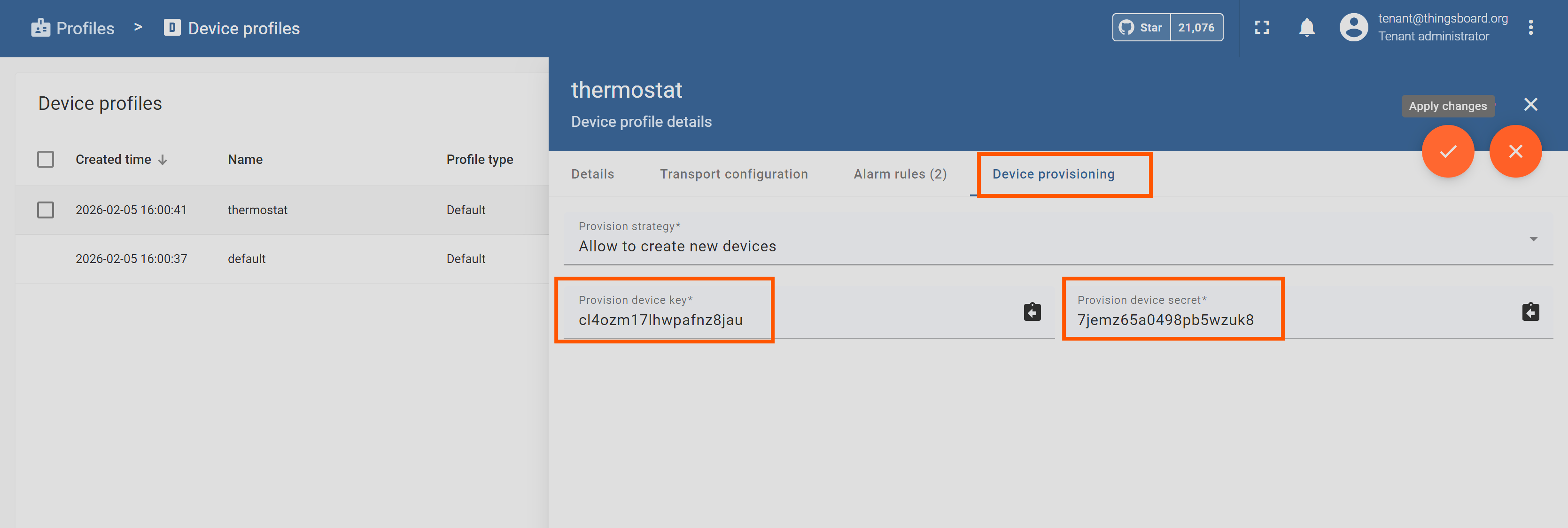
Open the device profile “thermostat”
Device provisioning -> Edit
Provision strategy: “Allow to create new devices”
Provision device key: cl4ozm17lhwpafnz8jau
Provision device secret: 7jemz65a0498pb5wzuk8
Save the profile (“apply changes”)
After this, the demo gateway self-provisions and starts sending simulated data.
Import the example dashboard
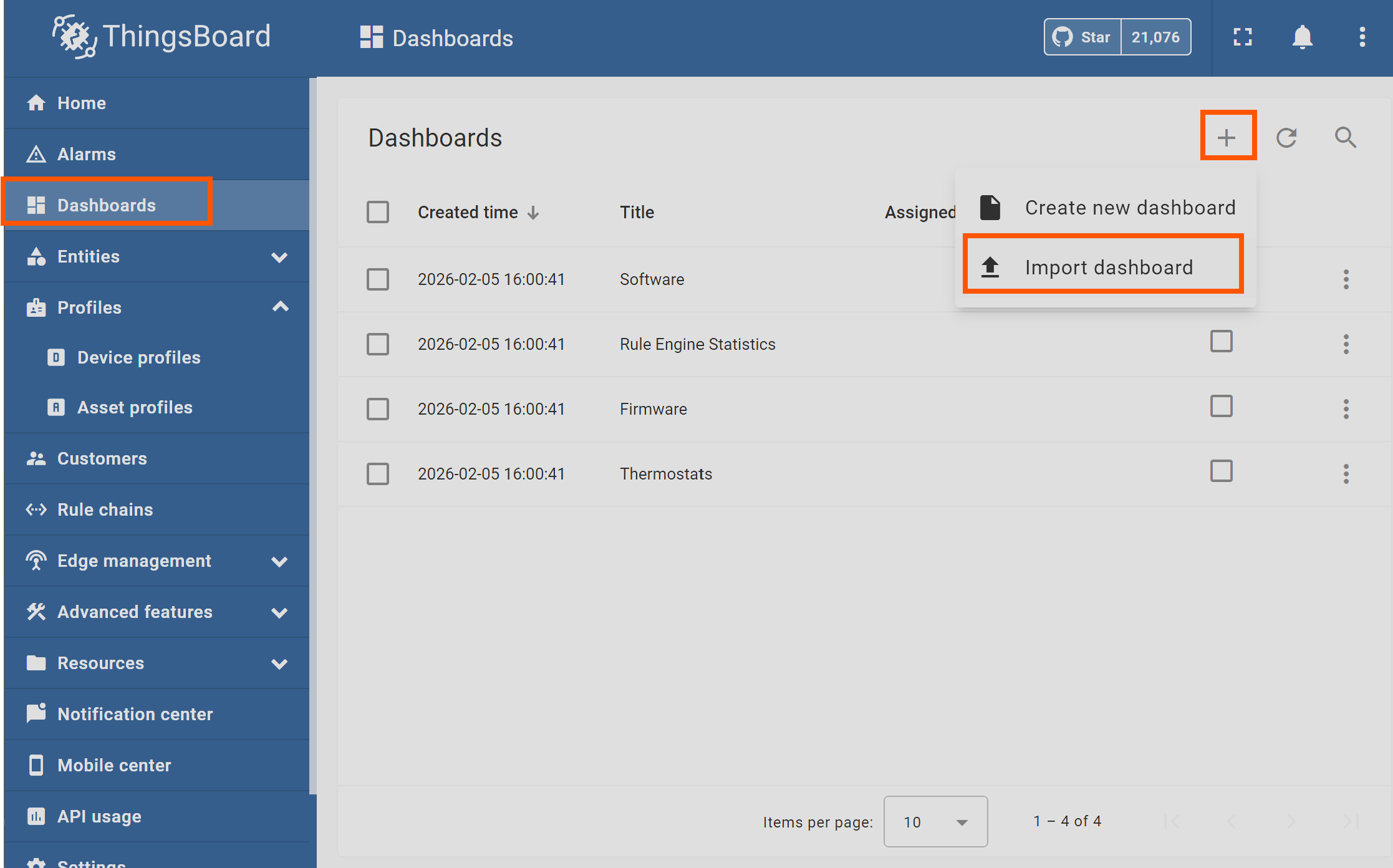
Go to Dashboards -> “+” -> Import
Import demo/example_dashboard.json
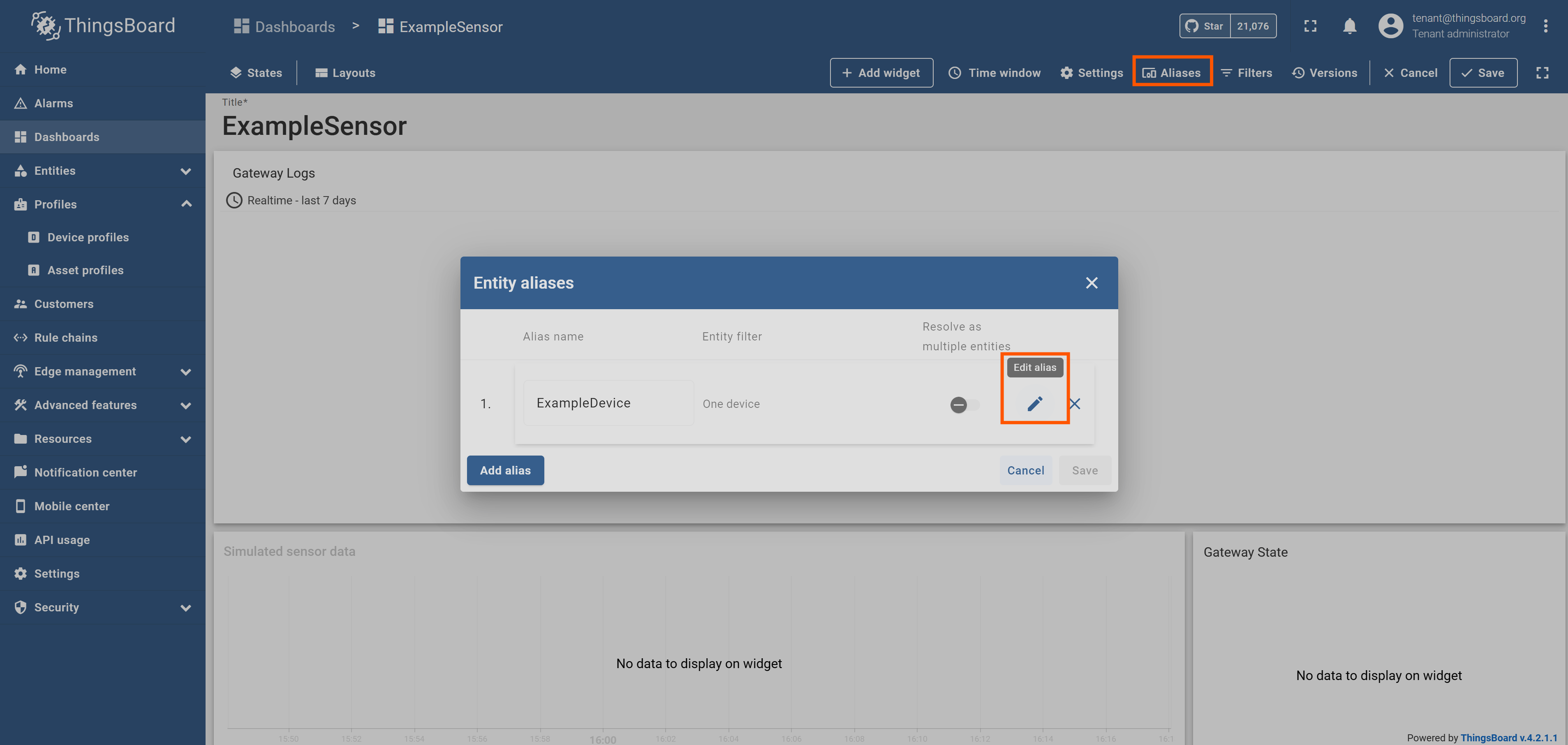
- Update the dashboard device alias to the new device ID created by self-provisioning
“Dashboards” > “Example Sensor” > “Edit mode” > “Aliases” > “Edit Alias”
Push and verify a controller config file
The demo can mirror a controller’s configuration file via device attributes.
Open the device created by self-provisioning (“Entities” > “Devices” > …)
“Device details” -> “Attributes” -> “Shared attributes” -> “Add” (“+”)
Create the FILES attribute with this JSON:
{
  "controller_config": {
    "path": "$DATA_PATH/config.json",
    "encoding": "json",
    "write_version": 1,
    "restart_controller_on_change": true
  }
}
Create the FILE_CONTENT_controller_config attribute with this JSON:
{
  "controllerType": "PID",
  "setPoint": 22.0,
  "kp": 1.0,
  "ki": 0.1,
  "kd": 0.01
}
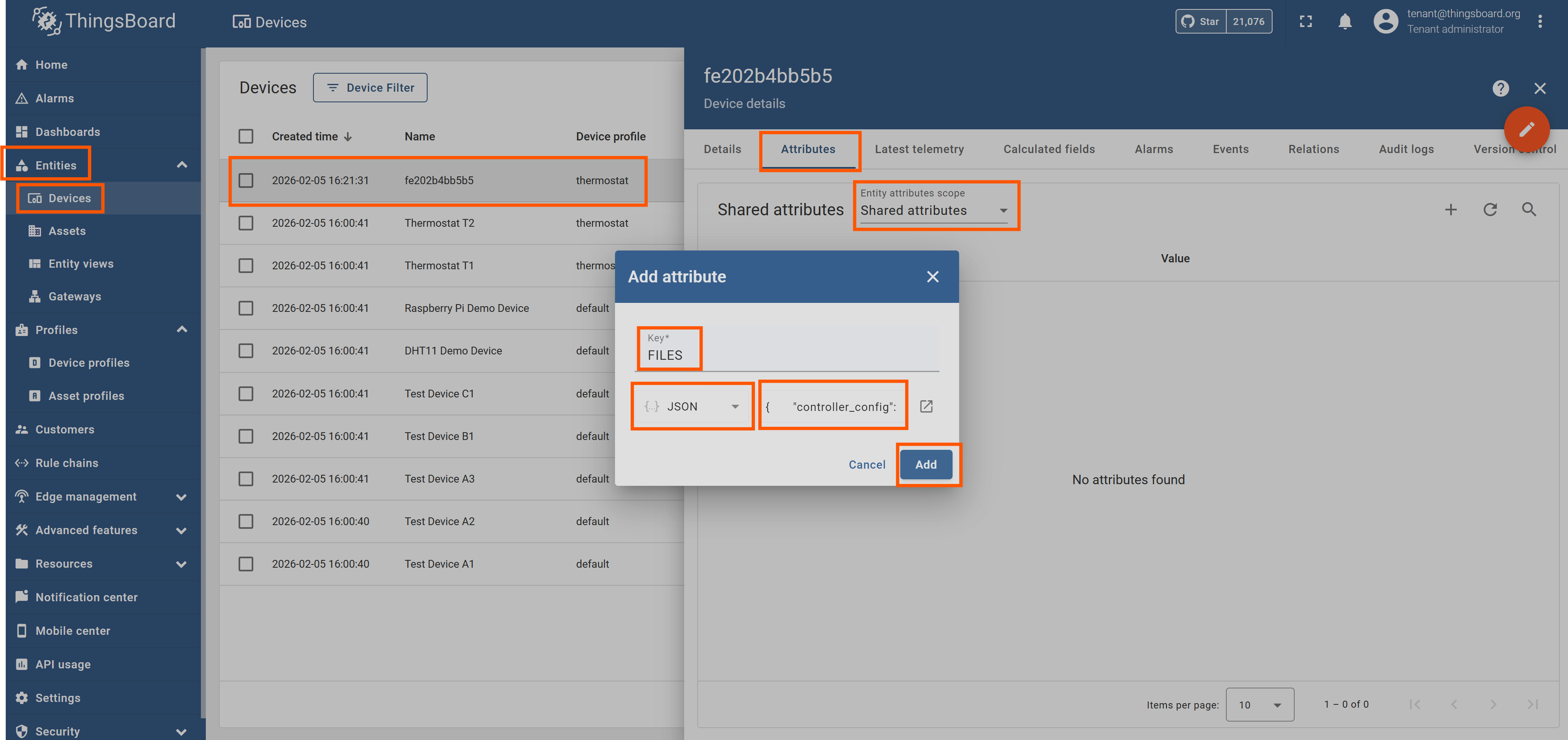
Wait for config.json to appear at the data path in your .env (see Prepare the demo data directory )
Modify the local config file and trigger the “Exit” RPC command via the button on the “Example Sensor” dashboard
Check the content of the client attribute FILE_READ_controller_config which should reflect the file’s content
Connect the gateway to an existing ThingsBoard instance
If you already have ThingsBoard running elsewhere, use the smaller compose file:
docker compose -f docker-compose.yml up
Set the following variables in .env before running:
TEG_DATA_PATH
TEG_TB_HOST
TEG_TB_PORT
Optional: regenerate the self-signed certificate
If you need a new self-signed certificate for the nginx proxy:
openssl req -x509 -newkey rsa:4096 -keyout server_key.pem -out server_cert.pem \
    -sha256 -days 9650 -nodes \
    -subj "/C=XX/ST=StateName/L=CityName/O=CompanyName/OU=CompanySectionName/CN=nginx" \
    -addext "subjectAltName=DNS:thingsboard,DNS:localhost"