Remote Software Update
The Remote Software Update feature allows deploying new versions of the TEG gateway controller software to devices using ThingsBoard’s OTA update mechanism. This enables the rollout of bug fixes, performance improvements, and new features without requiring physical access to deployed hardware.
OTA update packages reference git tags or commit hashes from the controller’s git repository. Once an OTA package is created and assigned to a device or device profile in ThingsBoard, TEG gateway devices automatically receive the update, download the corresponding source code using git, build a Docker image locally if required, and re-deploy the controller software Docker container.
The remote software update mechanism follows a controller-only update model. OTA updates apply exclusively to the TEG gateway controller software and never update or restart the TEG gateway runtime itself. This design ensures that connectivity, telemetry buffering, and management functions remain available throughout the update process.
Architecture Rationale
A key design principle of the TEG gateway is the strict separation between the gateway runtime and the controller software. This separation ensures that software updates to the controller do not affect the core TEG gateway functionality.
Even if a newly deployed controller version contains errors or fails to start correctly, the TEG gateway itself remains operational. It continues to report device status and update progress to ThingsBoard, allowing operators to monitor deployments and safely roll back to a previous, stable controller version when necessary.
This separation allows updates to be monitored and controlled remotely without risking loss of connectivity. Even in the case of repeated controller failures, the TEG gateway can continue reporting status information and accept corrective actions such as rollbacks or configuration changes.
Create an OTA Update Package
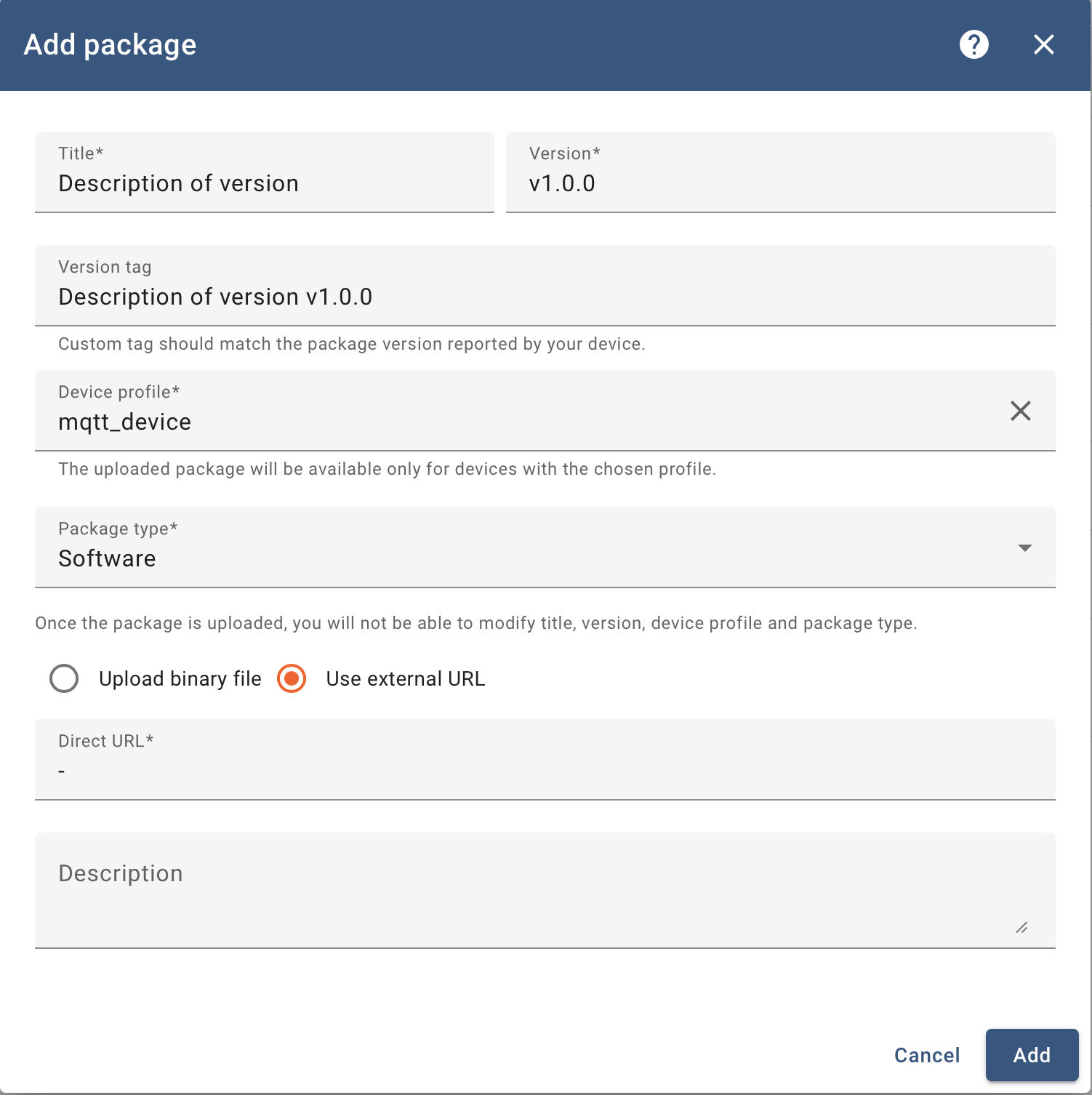
To deploy a new controller version, an OTA update package must first be created in the ThingsBoard Web UI.
Navigate to Advanced features → OTA Updates.
Create a new OTA update entry.
Set the Title to identify the controller version.
Set Version to match the git tag or commit hash of the controller release (for example
v1.0.0).Select the Device Profiles corresponding to the TEG gateway devices.
Set Package type to Software.
Enable Use external URL and leave the URL field empty (
-).
Note
The Version field is treated as an opaque identifier by the TEG gateway. It is not interpreted semantically and must match the git tag or commit hash used to retrieve the controller source code.
Assign the OTA Package to a Device
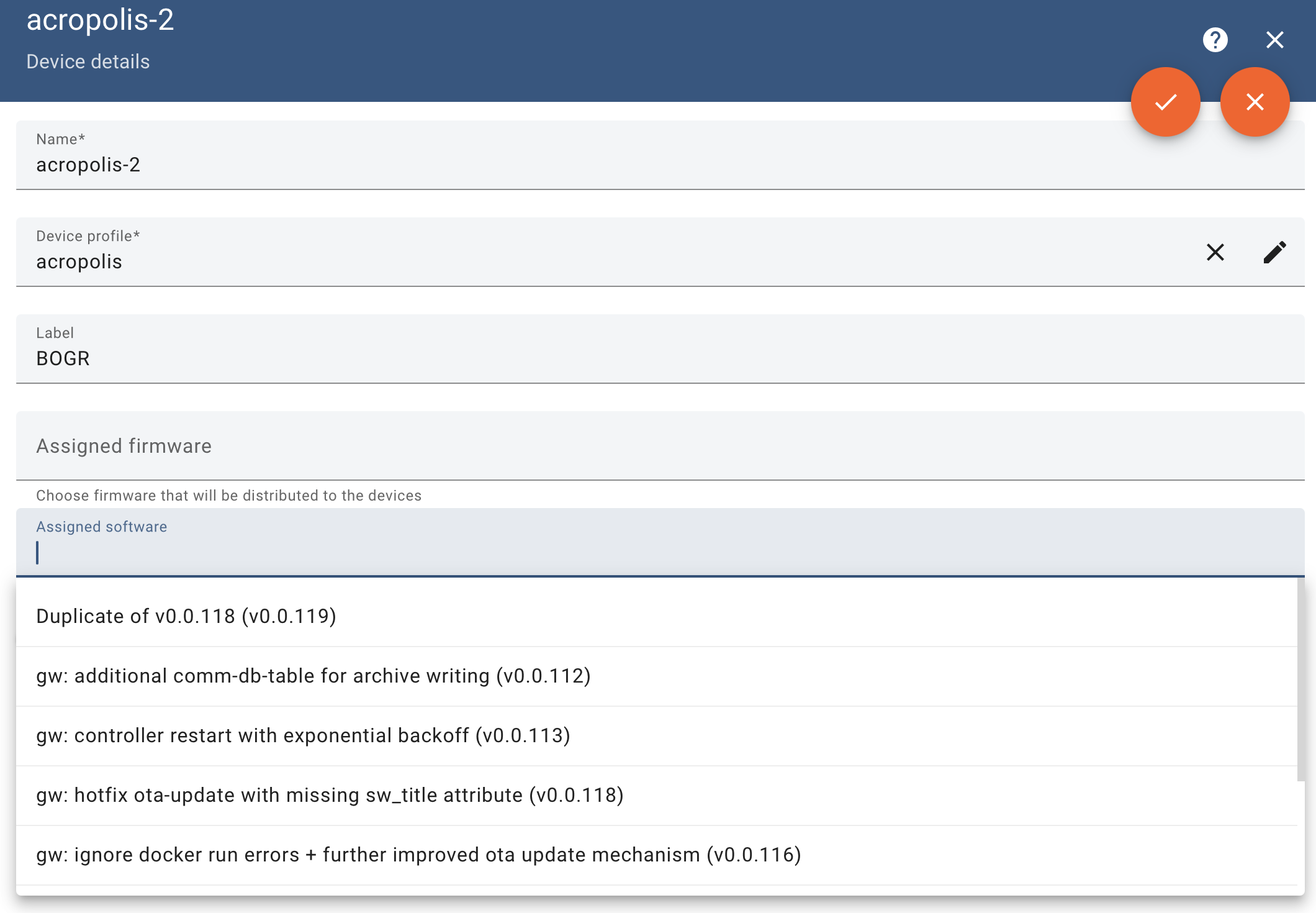
After creating the OTA package, it must be assigned to the target device.
Navigate to Entities → Devices.
Select the target TEG gateway device.
Open the Details tab and click Edit.
Under Assigned Software, select the previously created OTA package from the dropdown list.
Click OK to apply the changes.
Update Execution and Monitoring
Once the OTA package is assigned, the TEG gateway performs the update automatically:
The currently running controller is stopped.
The new controller version is downloaded using git fetch.
A new Docker image is built based on the new software.
The controller is restarted using the new Docker image.
During the OTA update process, the TEG gateway’s main loop is halted, and incoming telemetry from the controller may be temporarily unavailable.
Throughout the process, the TEG gateway reports its update state back to ThingsBoard using the standard OTA update attributes. The update progress and final status can be monitored via the ThingsBoard Update Dashboard using the sw_state attribute.
For additional details on OTA update states and workflows, refer to the official ThingsBoard documentation: https://thingsboard.io/docs/user-guide/ota-updates/
Rolling Back to Previous Versions
The remote software update mechanism also supports rolling back to earlier software versions.
Rollback operations follow the same execution path as forward updates. No special rollback mode is required, and the previously selected version becomes the desired state once assigned via ThingsBoard.
To perform a rollback, assign an OTA package that references the desired previous version tag or commit hash to the device. The TEG gateway will stop the currently running controller and restart it using the selected version.
If a Docker image for the requested version is already available locally, it is reused. Otherwise, the TEG gateway automatically downloads the corresponding source code from the git remote server and builds a new Docker image.
This approach enables rapid switching between controller versions and provides a reliable recovery path in case issues arise with newly deployed releases.
Operational Notes
OTA updates do not reboot the host system.
OTA updates do not restart the TEG gateway runtime process.
Network interruptions during downloads are handled transparently and retried once connectivity is restored.
For large fleets, staged rollouts using device profiles are recommended to reduce operational risk.